NEWS
NEWS
2026.08.10
Regarding the exclusive benefits of the "Upgrade Ticket"
Regarding the exclusive benefits of the "Upgrade Ticket"
Please read the following important notes before coming to the venue.
★ Exclusive entrance gate for "upgrade ticket" purchasers
On the day of the performance, please enter through the entrance gate reserved for those who purchased "upgrade tickets".
Please note that you will not be able to use the dedicated entrance gate from 10 minutes before the performance begins.
If you arrive 10 minutes or less before the show starts, please enter through the "Harajuku Entrance."
★ Exclusive original merchandise for "upgrade ticket" purchasers
- Group-specific fan (one design selected from a total of 9 designs when applying)
- Group-specific pin-attached emblem patch (one design selected from a total of 9 designs when applying)
Ticket card
• Original bag
On the day of the performance, please exchange your "upgrade ticket" for original merchandise at the designated exchange counter.
Please note that the benefits must be redeemed separately by the applicant and each accompanying person. Joint redemption is not possible.
Exchange time for original merchandise exclusively for "upgrade ticket" purchasers
<[Day1]~1st semester~>
[Date] August 13th (Thursday) Doors open 17:00 / Show starts 18:00
[Exchange Time] 14:00 - 18:00
<[Day2]~2nd semester~>
[Date] Friday, August 14th: Doors open 17:00 / Show starts 18:00
[Exchange Time] 14:00 - 18:00
<[Day3]~3rd semester~>
[Date] Saturday, August 15th Doors open 17:00 / Start 18:00
[Exchange Time] 14:00 - 18:00
<[Day4]~4th semester~>
[Date] August 16th (Sun) Doors open 13:00 / Show starts 14:00
[Exchange Time] 10:00 - 14:00
*The exchange booth for original merchandise exclusive to "upgrade ticket" purchasers is located outside the venue only. Please be sure to exchange your merchandise before entering the venue (before the show starts). Exchanges will not be available after the show ends.
*Please note that the venue is expected to be extremely crowded from 30 minutes before opening until just before the performance begins. To ensure a smooth experience, we kindly ask for your cooperation in exchanging your tickets with ample time to spare.
*Please note that the exchange time may change without notice due to weather conditions or other factors on the day.
*If you purchase upgrade tickets for multiple performances, you will need to exchange them for each performance date.
★ How to receive exchange vouchers and limited edition goods
To redeem the original merchandise exclusive to "upgrade ticket" purchasers, you will need an "exchange voucher (electronic)" issued separately from your performance ticket.
If you purchase two or more tickets, please distribute the "exchange voucher (electronic)" to your companions in advance, and each person must redeem their tickets individually. Group redemption is not possible.
*In unavoidable circumstances, such as illness of a companion, that make individual exchange difficult, we may allow group exchanges within the same group (applicant and companions). In this case, please distribute the "exchange vouchers (electronic)" in advance and consult with the reception staff at the venue on the day of the event.
*Tickets cannot be redeemed by a third party who has not purchased a ticket, and the benefits cannot be mailed or redeemed on other performance dates.
Distribution method for "Original Goods Exchange Voucher (Electronic) for Upgrade Ticket Purchasers"
① Ticket board My Page Access
② From the application details, tap "View Ticket" for the relevant ticket.
③ On the ticket details screen, select "Give Ticket" for the ticket you want to distribute.
④ You can select a companion from those registered at the time of application (you cannot change the companion you specified at the time of application).
⑤ Please check that the contents are correct and select "Confirm".
⑥ A "Ticket Distribution Notification" email will be sent to your companions. You can also check the distribution status on your My Page after it is complete.
How to display the voucher
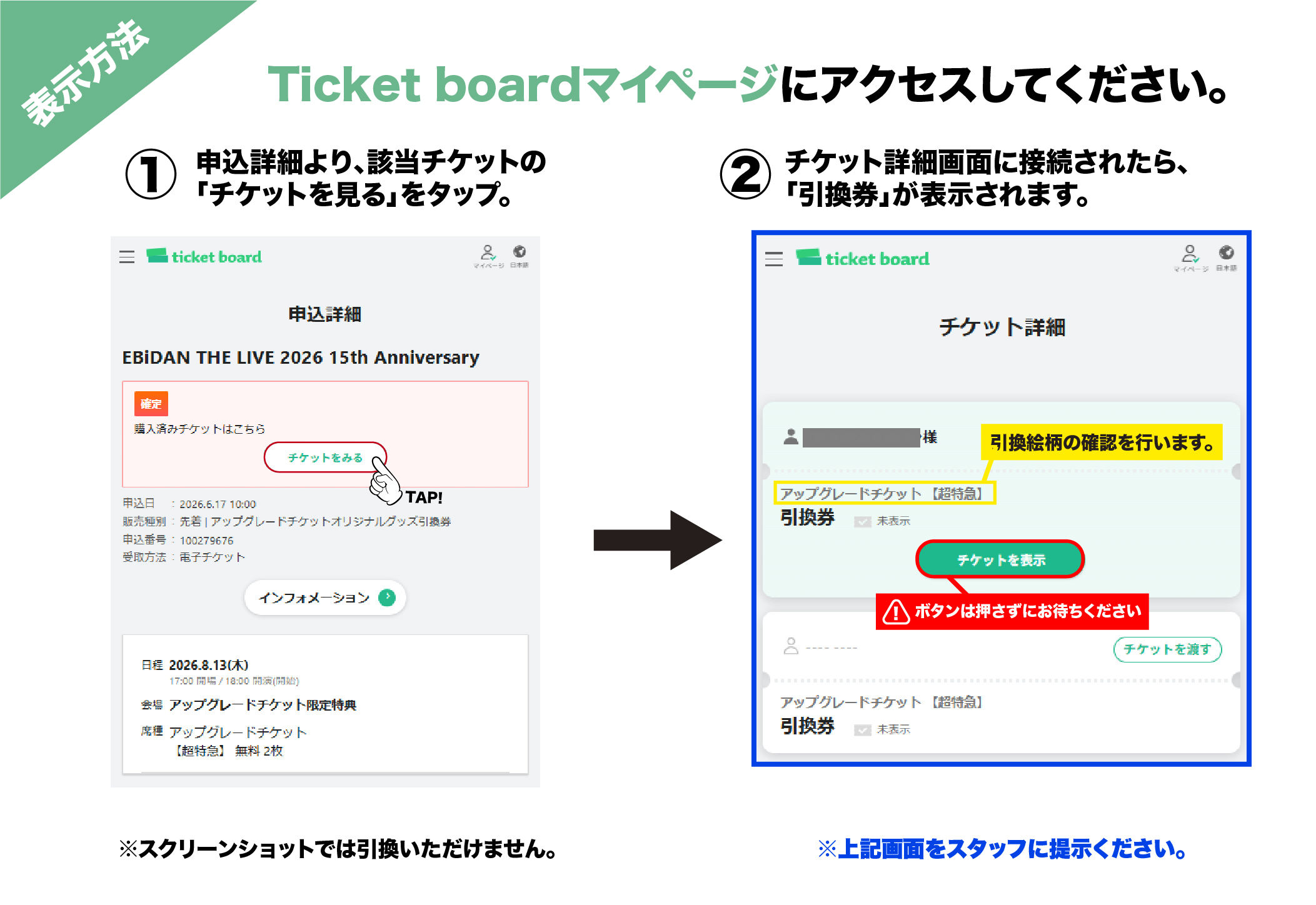
① Ticket board My Page Access
② From the application details, tap "View Ticket" for the relevant ticket.
③ Once you connect to the ticket details screen, the "Exchange Voucher" will be displayed.
Notes
*The distribution of merchandise exchange tickets and performance tickets is not linked.
*Even if you have distributed merchandise exchange tickets, you will need to distribute performance tickets separately.
*When exchanging your ticket on the day of the event, you will not be able to choose a design for a group other than the one you registered when applying for the "upgrade ticket".
*We cannot accept delivery of the bonus, exchange at a later date, or exchange on other performance days. Please be sure to exchange the bonus during the exchange time on the day of the performance.
*If you notice any defects in the goods you receive, please speak to a staff member at the upgrade-exclusive benefits exchange counter within the exchange time on the day of exchange. We will not be able to provide exchanges after the show or on a later date. Thank you for your understanding.